- Contacts (Inbound and Outbound)
- Executions (Outbound only)
- Versions (Inbound and Outbound)
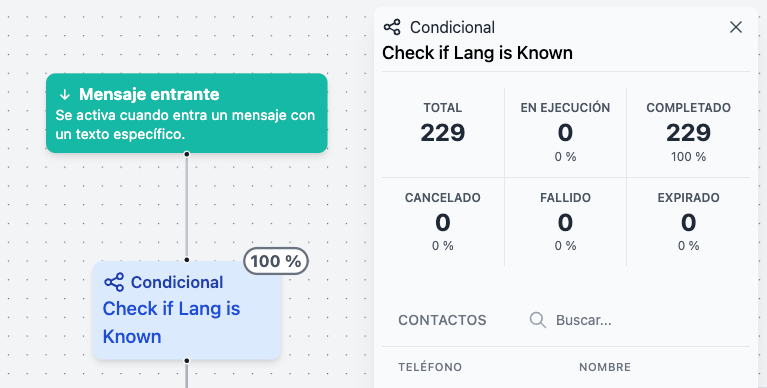
 Here you can see the current status of each contact that went through this flow:
- Contacts: Indicates how many contacts are in this execution or have entered the flow version.
- Expired: Indicates how many contacts stopped responding. The default waiting time for a response from the contact in the TEMPLATE, MENU or QUESTION steps is 24 hours, but you can customize this in each step.
- Ongoing: Indicates how many contacts are still active in the flow. This is either because we’re waiting for a response from the contact or because the flow has a DELAY step.
- Cancelled: Indicates how many contacts left the flow because their execution was canceled. These cancellations can be manual or due to the fact the contact already had an open conversation in the Inbox. You can customize this when executing a flow.
- Failed: Indicates how many contacts left the flow due to an error during execution. These errors can range from not being able to send a message to issues with a step, such as a failed connection with an external API.
- Completed: Indicates how many contacts reached one of the final steps of the flow.